
Scattered permitting sources
Air, water, construction, zoning, utility and operating updates may appear across different federal, state and local channels.
Monitor the environmental, energy, utility, workplace safety, data privacy, cybersecurity and government cloud requirements your organization selects. When something changes, Rixena helps your team understand what changed, what may be affected and what to review next.
Requirements can span federal agencies, state environmental authorities, utility commissions, local permitting offices, workplace safety rules and cloud security programs. Rixena brings the sources you select into a consistent monitoring and review process.
Air, water, construction, zoning, utility and operating updates may appear across different federal, state and local channels.
Multi-site operators may need distinct watchlists for each jurisdiction, utility territory, site design and operating profile.
Government and regulated-industry customers can introduce security, authorization and incident requirements that vary by service.
Teams need source links, dates, affected topics and ownership—not another unstructured alert with no clear next step.
Select the jurisdictions, facilities, programs and official sources that matter to your operations. Expand coverage as sites, services and customer obligations change.
Selected EPA, state and local sources covering stationary engines, turbines, air permits, testing, reporting and emergency generator operation.
NPDES, construction and industrial stormwater, water discharge, water-use and environmental reporting sources when applicable.
Utility commission dockets, tariffs, interconnection and demand-response materials, plus selected zoning, building and fire-code sources.
OSHA electrical safety, lockout/tagout, emergency planning, contractor safety and related state occupational requirements.
Selected NIST, CISA, FedRAMP, CMMC and federal cloud security sources relevant to the services and customers you support.
Selected state privacy and breach-notification laws, regulator guidance and incident-response requirements tied to data handling and services.
Monitor availability and applicability vary by source, jurisdiction, facility and service. Your team chooses the watchlist it wants Rixena to follow.
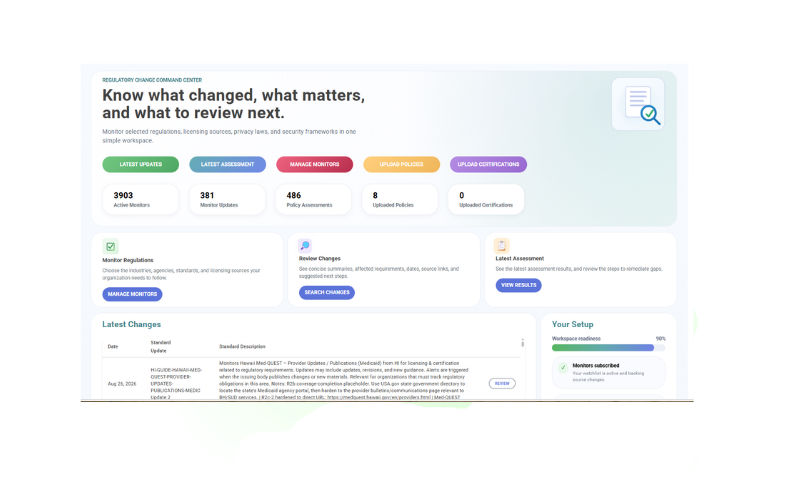
Select your monitors, receive organized change intelligence and optionally connect policies for assessment.
Choose the agencies, permits, standards, utility sources, cloud programs and jurisdictions relevant to your facilities and services.
See what changed, important dates, affected requirements, source links and suggested review areas.
Upload and assign environmental, safety, security, privacy or operating policies to the monitors they support.
Review potential policy gaps, ownership, next steps, review activity and supporting evidence in a consistent workflow.
Rixena follows the rule, permit, bulletin, docket, standard or guidance source your team selects.
The update is captured, summarized and organized so reviewers can focus on what changed.
Your team receives a focused review package instead of another unstructured alert.
Rixena can support organizations with different site types, utility relationships, customer commitments and operating models—without forcing every facility or cloud service into the same watchlist.
Create your free monitoring accountReduce repeated searches across agency, utility, permitting and program websites.
Give facilities, security, compliance and legal owners the source, dates and review context in one place.
Connect selected requirements with the operating policies, procedures and controls your teams rely on.
Keep updates, assessments, review activity, ownership and supporting evidence organized.
Start with selected regulatory and standards monitoring, then add policy assessment workflows when your team is ready.
Talk to AllgressOrganizations can select applicable federal, state and local sources covering environmental permits, stationary engines and backup power, water and stormwater, utility and siting matters, workplace safety, privacy, cybersecurity and government cloud requirements. Available coverage depends on the selected monitors and sources.
Yes. Watchlists can be organized around the locations, operating models, utilities, permitting authorities and requirements relevant to each facility or service environment.
Rixena can help teams monitor selected official FedRAMP, CMMC and related federal cloud security sources when relevant. Your organization determines which requirements apply, and available coverage depends on the selected monitors.
Yes. You can use Rixena for regulatory monitoring and change alerts without uploading policies. Policy uploads are optional and enable policy assessment workflows.
You assign uploaded policies to relevant monitors. When selected requirements change, Rixena can assess the assigned documents and identify areas that may require review, clarification or remediation.
No. Rixena provides regulatory intelligence, workflow support and policy assessment assistance. Your organization remains responsible for determining applicability and obtaining legal or professional advice where needed.
Get a free Rixena account and begin building your organization’s monitoring watchlist.